
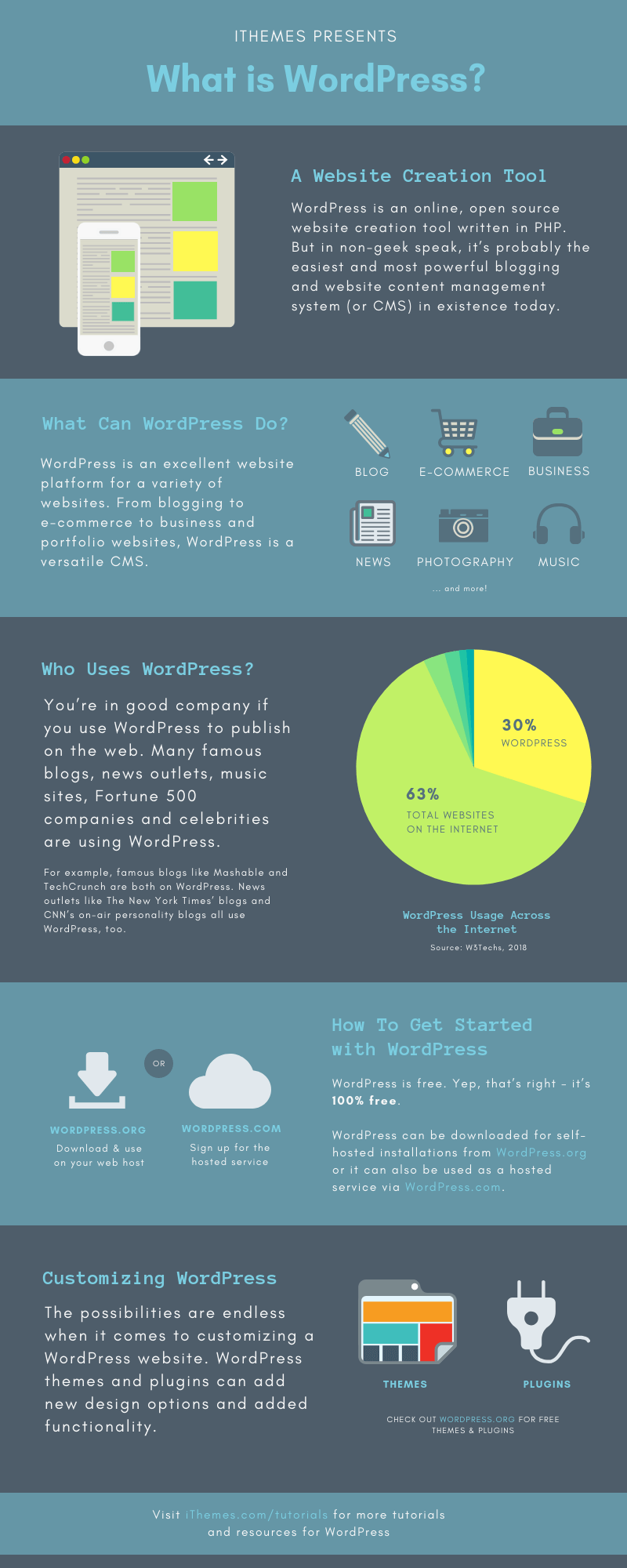
What is WordPress? WordPress is an online, open source website creation tool written in PHP. But in non-geek speak, it’s probably the easiest and most powerful blogging and website content management system (or CMS) in existence today.
Just Getting Started with WordPress?
Our handbook for beginners offers an introduction to WordPress, the amazing open-source website platform. You’ll learn the benefits of using WordPress, as well as step-by-step instructions for getting familiar with the WordPress Dashboard. You’ll also learn about WordPress themes and plugins, how to create your first post or page, and optimize your site for search engines—all with helpful links to video tutorials.
Download the Free Ebook
Who uses WordPress?
You’re in good company if you use WordPress to publish on the web. Many famous blogs, news outlets, music sites, Fortune 500 companies and celebrities are using WordPress.
For example, famous blogs like Mashable and TechCrunch are both on WordPress. News outlets like The New York Times’ blogs and CNN’s on-air personality blogs all use WordPress, too.
If you’re ever curious about who uses WordPress, head on over to the WordPress site showcase and you’ll be impressed by the number of well-known sites and famous people using WordPress to power their websites.
What can WordPress do?
WordPress is an excellent website platform for a variety of websites. From blogging to e-commerce to business and portfolio websites, WordPress is a versatile CMS.
Here are just a few examples of the types of websites you can build with WordPress:
- Blog
- E-commerce
- Business
- News
- Photography
- Music
- Membership
How do I get started using WordPress?
Now you’re probably asking, “how do I get it?”
WordPress is free. Yep, that’s right – it’s 100% free.
WordPress can be downloaded for self-hosted installations from WordPress.org or it can also be used as a hosted service via WordPress.com.
So, what are you waiting for? Go get WordPress today to start creating your awesome website.
Customizing WordPress
The possibilities are endless when it comes to customizing a WordPress website. WordPress themes and plugins can add new design options and added functionality. Check out WordPress.org for free themes and plugins.
More WordPress 101 Tutorials
- WordPress.com vs WordPress.org
- Your WordPress Login
- Exploring the WordPress Dashboard
- Using the WordPress Admin Bar
- Exploring WordPress Settings
- WordPress Posts vs Pages
- Creating a WordPress Post
- Adding Links in WordPress
- Adding Images in WordPress
- Using the WordPress Media Library
- Formatting WordPress Posts
- Scheduling WordPress Posts
- WordPress Categories & Tags
- Creating a WordPress Page
- Applying a WordPress Page Template
- What are WordPress Plugins?
- Installing WordPress Plugins
- What is a WordPress Theme?
- Using WordPress Widgets
- How to Install a WordPress Theme
- Creating a Custom Menu in WordPress
- Managing Comments in WordPress
- Creating Users in WordPress
Client Portal WordPress Plugins 
1. Clinked –
This Client Portal WordPress Plugin is very efficient and a great helping hand in terms of client management. It has many features like you can exchange the files in one place, chat with your clients and more.

Features-
Now let’s see what this Client Portal WordPress Plugins hold.- This plugin assigns the task to teammates, sets the deadline, and watches the whole process of a project.
- Provides organized meetings and events.
- This plugin provides the Real-time updates on the projects.
- It creates the workspace for you and your clients.
- You can share files, can chat and collaborate with your clients.Provides bank-grade security for clients data.
Price-
This Plugin offers different prices depending on the features which are as follows:- Starters – $ 99/ month : It provides 100 GB storage, 100 members, and unlimited guests.
- Collaboration $ 249/ month : It has all the starter features. And it also provides shared calendar, group chat, full-text search. It also provides up to 1 TB storage and custom domain.
- Enterprise (Contact the Team) : It has all the collaboration features. And it also provides integrations, workflow, custom terms, and services.2.
2. SuiteDash –
Out of all Client Portal WordPress Plugins, it is one of the best business management and client portal plugin. It is a single system designed to provide easiness in one’s works. It combines multiple tools which will help in maximizing your productivity.

Features-
Let’s check the Features of this client portal plugin.- This plugin provides many tools like – CRM, project management, invoice generation, online payments, live chat etc.
- Fully encrypted data to and from this plugin.
- No need to do copy or duplicate entries as SuiteDash shares the same data in all its part.
- Time-saving and also boosts the efficiency.
Price-
This Plugin offers different prices depending on the features which are as follows:- Basic – $ 9/ month : In this, you can handle 5 projects with 10 clients and 5 staff members with 1GB storage.
- Plus – $ 19/ month : In this, you can handle unlimited projects with 50 clients and 25 staff members. It provides up to 10 GB storage place with the branded environment.
- Aspire – $ 49/ month : In this, you can have unlimited projects with 500 clients and 500 teammates. It provides up to 50 GB storage place with the branded environment and Email marketing
- Elite – $ 55/ month : In this, you can have unlimited projects with 5000 clients and 5000 teammates. It provides up to 100 GB storage place with the branded environment, URL, and Email marketing.
3. OfficeWP –
This WordPress Plugin will help you in creating unlimited clients, unlimited portals. And also by using this plugin, you can share files with your clients without worrying about data loss etc.

Features-
Let’s see what this plugin is holding up.- Your clients can only access the page when you allow them.
- You can also upload the file from WordPress site.
- You can assign files to anyone.
- Clients will also be able to upload files by themselves.
- All file size and type supported.
- Most important is that you can turn off or on all the features according to your use.
Price-
The prices of this plugin vary according to the number of sites you use which are as follows:- 1 site – It charges $ 44 per year and $ 22 for its annual renewals supporting only 1 URL.
- 3 site – It charges $ 77 per year with annual renewal of $ 33 and supports 3 URLs.
- 10 sites – It charges $ 111 per year with annual renewal of $ 55 supporting 10 URLs.
- 25 sites – It charges $ 222 per year with annual renewal of $ 111 supporting up to 25 URLs.
4. Client Portal – Private User Pages and Login –
Client Portal WordPress Plugin provides each user a private page. These private pages are accessible only on the frontend by the owner of that page after login.

Features-
Now we will study the features of this plugin.- It never asks you to login or to fill a registration form.
- This plugin shows your clients only things you want them to see.
- You can add the shortcode at any page.
- Whenever a client tries to access any other page then he will be redirected to his private page.
Price-
This Client Portal WordPress Plugin is an open source software i.e., available free of cost.
5. WP Customer Area –
This plugin is a one-in-all plugin for the persons who want to manage their private content. Themes are customizable in this plugin. We can share files and data with one or many users as well.

Features-
Let’s check the features of this Client Portal WordPress Plugin.- This plugin is secure and gives personal access to clients.
- You can assign a particular file to a particular person and will list in his personal area.
- You can assign private pages to particular persons as well.
- Also, you can translate this plugin into your language.
Price-
This WordPress Plugin is an open source software i.e., available free of cost.
Conclusion –
This is all we have in 4+ Best Client Portal WordPress Plugins. We hope you found something suitable for you. If you like our blog make sure to comment.

nice
ReplyDelete